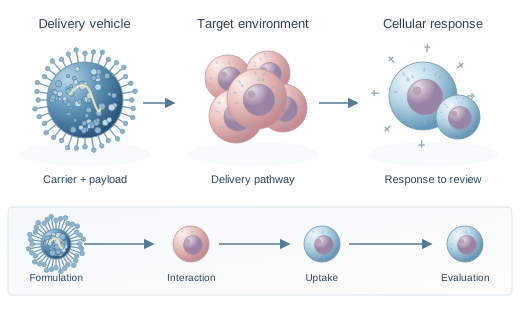
Separate exposure, interaction, and response. This graphical abstract uses a left-to-right sequence to keep several biological scales readable.
From research to a clearer picture
Graphical Abstracts, Made Clear.
Turn your research into a clear graphical abstract. Explore thoughtful examples, choose a layout, and use AI to shape a first draft you can review against your science.
Try an idea
Research first.Your findings lead the visual.
Room to refine.A draft, with your judgment.
Made to explain.One focused visual story.
A visual research conceptFig. 01
Targeted delivery,
clearly explained.
Before you share
Verify each label
Check the science
Review journal rules
Small details. A more readable story.
01 / 03
BiologyChemistryClinical researchEngineeringMachine learningDifferent disciplines.
The same need for clarity.
The same need for clarity.
A graphical abstract gives your research
one clear point of entry.
Bring the question, approach, and principal finding into a single visual summary. Give readers enough context to follow the work, then let your paper carry the detail. Keep the evidence intact, define unfamiliar symbols, and leave out decoration that competes with the message. For a quick readability check, view the composition at its intended display size. Labels that require zooming need revision.
What is a graphical abstract?Selected examplesResearch stories.
Research stories.
Thoughtfully visualized.
Explore graphical abstract examples through the choices behind them: reading order, visual hierarchy, and the connection between a method and its outcome.
Explore all examplesThese are illustrative concepts, not summaries of published studies.
Use a consistent color for the carrier. Introduce the target separately, then reserve the final panel for the response your study actually measured.
Connect inputs, screening, and candidate selection. A graphical abstract should distinguish a model prediction from an experimentally verified result.
The making of a visualFrom research text
From research text
to graphical abstract.
Begin with the sentence your reader should remember. Build around that message, rather than trying to fit every experiment onto the canvas.
Describe the research.
For your graphical abstract, name the research question, study system, method, and main finding. Include exact terminology and numbers that must stay unchanged. Only share material you have permission to use.
Find the visual structure.
Use the AI graphical abstract generator to explore a mechanism, comparison, or sequence. Choose the arrangement that explains the work with the fewest unnecessary elements. Keep related panels aligned, and give important labels enough space to remain legible when the image is reduced.
Review before sharing.
Check the graphical abstract against your source. Inspect labels, arrows, scale, and numerical values. Confirm that visual relationships reflect your evidence and that the intended use permits AI-generated imagery.
The layout collectionA head start
A head start
for your next figure.
Start with a graphical abstract template that fits your story. These layout references suggest a reading order without deciding what your research should say. Use a comparison for two conditions, a sequence for a process, or a central mechanism for linked interactions.
Browse all templatesMechanism
Layout reference
Workflow
Layout reference
Comparison
Layout reference
Clinical study
Layout reference
Summary
Layout reference
Preview a layout, then describe your own research in the Maker. Generated results are PNG images; review every scientific relationship.
Explore layout referencesFrom the reading deskA little guidance.
A little guidance.
A stronger visual.
Build your graphical abstract with practical decisions about content, layout, and readability. Read the guide that matches the part you are working on. Bring a draft to the guide and apply one change at a time.
010203040506
What is a graphical abstract?
Understand its purpose, essential elements, and relationship to a written abstract.
How to make a graphical abstract
Work from a research takeaway to a layout, then review the finished draft.
Graphical abstract design
Make deliberate choices about typography, color, arrows, and visual hierarchy.
Graphical abstract software
Compare editing control, export formats, licensing, and the work each tool suits.
From research paper to graphical abstract
Extract the question, method, principal result, and supported meaning before drawing.
Prepare a graphical abstract for a journal
Check dimensions, files, rights, disclosure, and scientific review before submission.
Before submissionKnow the brief.
Know the brief.
Check the rules.
A graphical abstract for a journal needs more than the right dimensions. Check the publication's current instructions for file format, text, permissions, and AI use before preparing submission artwork. Requirements can differ between titles from the same publisher, so avoid treating one specification as a universal standard.
Read the Elsevier guideRead the Cell Press guideGo to the original guidanceElsevierAuthor instructions ↗WileyFigure guidance ↗
Elsevier's AI policy prohibits general-purpose generative AI image tools for this type of submission. Check the exact journal and intended use.
Sources checked September 9, 2026.
Independent resource; no publisher affiliation or endorsement. This tool supports visual drafting and does not guarantee scientific accuracy, submission compliance, or journal acceptance.
A few useful answersYour graphical abstract,
Your graphical abstract,
questions answered.
Start with the purpose and intended audience. The right workflow follows from what you need to explain and where the image will appear.
What belongs in a graphical abstract?
Include the research context, the key method or comparison, and the principal finding. Use short labels, a clear reading order, and only the details needed to understand the takeaway.
Can I submit an AI-generated image?
Only when the target journal’s current policy permits the specific use. Check image rules, disclosure requirements, and permissions. Treat every graphical abstract as a draft until its science and publication requirements have been reviewed.
How do I use the layout references?
Use the references to choose a reading order, then describe your study in the Maker. Results are PNG images. Revise your prompt and generate again to explore changes; the Maker does not provide an editor for individual text labels, shapes, or layers.
Do I need design experience?
A graphical abstract maker can help you explore a layout without beginning from a blank page. You still bring the subject knowledge: verify the terminology, evidence, and message before using the result.
A clearer view of your workYour next graphical abstract
Your next graphical abstract
starts with an idea.
Bring the research.
Give the reader a clear way in.